
Hack 94. Generate Flash Movies on the Fly
Use Ming to create dynamic Flash movies from PHP. Have you ever wanted to make a web graphic have a little more pizzazz or zing? We all have at some point. One way to do this is to use the Macromedia Flash format (also known as the SWF format). But how do you do that with just open source tools? Well, there is a PHP module called Ming that saves the day (ironic, isn't it? Ming saves Flash?). It allows you to generate full-blown Flash files on the fly. This hack will show you how to pull that off with a Flash application that dynamically generates charts. 9.10.1. The CodeSave the code in Example 9-13 as data.php. Example 9-13. Some XML to be rendered by Flash
<?php
header("Expires: Mon, 26 Jul 1997 05:00:00 GMT");    // Date in the past
header("Last-Modified: " . gmdate("D, d M Y H:i:s") . " GMT"); // always modified
header("Cache-Control: no-store, no-cache, must-revalidate");  // HTTP/1.1
header("Cache-Control: post-check=0, pre-check=0", false);
header("Pragma: no-cache");                          // HTTP/1.0
header('Content-type: application/xml');
echo("<?xml version=\"1.0\" ?>\n");
?>
<GRAPH TYPE="BAR">
     <TITLE>Revenues 2005</TITLE>

	 <YAXIS>Dollars
          <RANGE MIN="0" MAX="50000" />
     </YAXIS>

     <XAXIS>Period
	 </XAXIS>

<DATA>

<?php
     $colors = array( "0xFF0000", "0xFFFF00", "0xFF00FF", "0x00FFFF", "0x00FF00" );

	 srand((double)microtime()*1000000);

	 for ($i = 1; $i < 7; $i++)
	 {
       $clr = $colors[ ($i - 1) % count($colors) ] ;
	   $val = rand(10000,45000);
	   echo("<D$i>$val<COLOR C=\"$clr\" /></D$i>\n");
     }
	 /*
	 <D1>20000<COLOR C="0xFF0000" /></D1>
	 <D2>25000<COLOR C="0xFFFF00" /></D2>
	 <D3>27000<COLOR C="0xFF00FF" /></D3>
	 <D4>42000<COLOR C="0x00FFFF" /></D4>
	 <D5>48000<COLOR C="0x00FF00" /></D5>
	 */
?>

</DATA>
</GRAPH>
graph.php, shown in Example 9-14, is the actual PHP script that does the work (with lots of help from Ming). Example 9-14. Ming and PHP to the rescue
<?
     ming_useswfversion(6); // Important!

	 $m = new SWFMovie();
	 $m->setBackground(0x80, 0x80, 0x80);
	 $m->setDimension(320, 240);
	 $m->setRate(30.0);

	 $s = new SWFShape();
	 $f = $s->addFill(0xff, 0xff, 0xff);
	 $s->setRightFill($f);

	 $s->movePenTo (-5, 0);
	 $s->drawLineTo( 5, 0);
	 $s->drawLineTo( 5, -10);

	$s->drawLineTo(-5, -10);
	$s->drawLineTo(-5, 0);

	$p = new SWFSprite();
	$i = $p->add($s);
	$i->setDepth(1);
	$p->nextFrame();

	$i = $m->add($p);
	$i->setDepth(1);
	$i->moveTo(-10, -10);
	$i->setName("box");

	$m->add(new SWFAction("

	var data = [];
	var heights = [];
	var actual = [];
	var timerID;

	// Animate the bars to their final position
	function anim ()
	{
      var done = true;
	  for (var k = 0; k < data.length; k++)
	  {
        var n = 'D' + k;

		if (heights[k] != actual[k])
           done = false;
        else
           continue;

        var diff = (heights[k] - actual[k]) / 5;
		actual[k] += diff;
		_root[n]._height = actual[k];
		if (diff < 0.1)
           actual[k] = heights[k];
      }
    if (done)
	{
      clearInterval(timerID);
	  stop();
    }
	};

	// Take the XML data transformed into a JavaScript/ActionScript
	// object and display it

	function doit(o)
	{
      // Take the data and draw
	  // Draw the axes
	  createEmptyMovieClip ('grp', 1);
	  with (grp)
	  {
	  lineStyle (1, 0xFFFFFF, 100);
	  // X - Axis
	  moveTo (40, 200);
	  lineTo (280, 200);
	  // Y - Axis
	  moveTo (40, 200);
	  lineTo (40, 20);

	  // Draw the Main Title
	  createTextField('title', 1, 100, 00, 100, 100);
	  var fmt = new TextFormat();
	  fmt.color = 0xffffff;
	  fmt.font = 'Arial';

	  title.text = o['TITLE']['_txt'];
	  title.setTextFormat(fmt);

	  // Draw the X Axis Title
	  createTextField('xtitle', 2, 120, 220, 100, 100);
	  var fmt = new TextFormat();
	  fmt.color = 0xffffff;
	  fmt.font = 'Arial';
	  fmt.size = '10';

	  xtitle.text = o['XAXIS']['_txt'];
	  xtitle.setTextFormat(fmt);

	  // Draw the Y Axis Title
	  createTextField('ytitle', 3, 0, 100, 100, 100);
	  var fmt = new TextFormat();
	  fmt.color = 0xffffff;
	  fmt.font = 'Arial';
	  fmt.size = '10';

	  ytitle.text = o['YAXIS']['_txt'];
	  ytitle.setTextFormat(fmt);

	  // Draw the Y Axis Labels
	  createTextField('ylabeltop', 5, 20, 16, 20, 20);
	  var fmt = new TextFormat();
	  fmt.color = 0xffffff;

	  fmt.font = 'Arial';
	  fmt.size = '6';
	  fmt.align = 'right';
	  ylabeltop.text = o['YAXIS']['RANGE']['1'];
	  ylabeltop.setTextFormat(fmt);

	  createTextField('ylabelbot', 6, 20, 193, 20, 20);
	  var fmt = new TextFormat();
	  fmt.color = 0xffffff;
	  fmt.font = 'Arial';
	  fmt.size = '6';
	  fmt.align = 'right';
	  ylabelbot.text = '0';
	  ylabelbot.setTextFormat(fmt);

	  };    // End with(grp)

	  // Draw the Data
	  // Determine how many data items we have
	  for (var k = 0; k < 10; k++)
	  {
        if (typeof(o['DATA']['D'+k]) == 'object')
          data.push(o['DATA']['D'+k]);
      }

	  // Draw the Data
	  // Go through each data item and position a movie there

	  var increment = 180 / data.length;
	  var width = increment / 2;
	  var max = Number(o['YAXIS']['RANGE']['1']);

	  for (var k = 0; k < data.length; k++)
	  {
        // dup the box into a new column
		var n = 'D' + k;
		duplicateMovieClip(box, n, 10+k);

		// move to final position
		_root[n]._x = 40 + ((k + 1) * increment);
		_root[n]._y = 199.5;
		_root[n]._width = width;

		// Set heights initially to zero, and animate later
		_root[n]._height = 0;

		// Get the data value and transform to viewport
		var n2 = 'D' + (k+1);
		var h = 180 / max * Number(o['DATA'][n2]['_txt']);

		heights.push(h);
		actual.push(0);

		var c = new Color(_root[n]);
		c.setRGB(Number(o['DATA'][n2]['COLOR']['1']));
      }

      // We are done, setup an animation timer to refresh
	  // the movie clip sizes every 32 millis until they achieve
	  // their final height.

	  timerID = setInterval(anim, 32);
    }

	function convertToJS(nodes, o)
	{
      if (arguments.length == 1)
        o = {};

      for (var i = 0; i < nodes.length; i++)
	  {

        if (nodes[i].nodeType == 1)
      {
        var tmp = convertToJS(nodes[i].childNodes);

		// Add attributes
		var attribs = nodes[i].attributes;
		for (var j in attribs)
            tmp[i] = attribs[j];
          var name = nodes[i].nodeName;

        o[name] = tmp;

      }
	  else
	  {
        var v = nodes[i].nodeValue;
		o._txt = v;
      }
	  }

	  return o;
	}

	var xml = new XML();
	xml.ignoreWhite = true; // Otherwise lots of blank nodes created

	xml.onLoad = function(success)
	{
      if (!success)
	  {
        // Do a Javascript alert here through a url
		return;
	  }
	  var o = convertToJS(this.childNodes[0].childNodes);

	  doit(o);
    };
	xml.load('data.php');

	"));
	$m->nextFrame();

	header('Content-type: application/x-shockwave-flash');
	$m->output();

?>
The process used here is illustrated in Figure 9-15. The file graph.php is called by the web browser to render. The script then uses the Ming library to generate a movie with some simple off-screen sprites. As the final action of the movie, it will call some ActionScript to load an XML file from a URL. This XML file will be dynamically generated by PHP in data.php. Currently, data.php generates random data for a bar chart. Once the data is loaded and parsed by the Flash player, the bars are animated to display their final values. Figure 9-15. The relationship between the player and the PHP scripts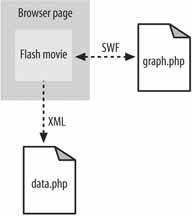
The Ming PHP library is object oriented (OO), which is nice, so it uses classes throughout the process. This makes it easy to see what methods each object supports. The most important class is the SWFMovie class. This is the class that will render the elements into the SWF file with an output( ) call. To see something, though, you need to add display objects to the movie. I created a simple white box sprite that will be placed off-screen and will be used as the prototype for the bars in the chart. Finally, an ActionScript object (SWFAction) is added. The ActionScript code in the Flash object does the bulk of the work, and demonstrates what customizations you can make in a Flash application.
The code defines several functions that will be used later on in the rendering process. Finally, it creates an XML object and does the interesting work, talking over a network to retrieve an XML file (a hack just isn't cool if you aren't talking over a network).
Since it can take a while to retrieve and read the XML, this process is done asynchronously. Otherwise, Flash animations would halt, waiting on ActionScript to load in a file from over the Net. When the file is read, the XML object calls the onLoad( ) function to load the data from data.php. This starts the chain of events that actually renders the data. To get the XML object, a simple PHP script was written to generate the XML file needed for the charting. PHP can render XML just as easily as its close relative, HTML. There are a few gotchas, though. Notice the header modifications in Example 9-13. It turns out that without these headers, the Flash XML object will aggressively cache the data (to your chagrin, when that data actually changes). Another thing to note is the echo of the XML prolog. If you don't put this line ininstead of putting out the prolog in the script, along with the rest of the XMLPHP will refuse to run your script. After the XML file is loaded and parsed, the XML DOM is converted to a hierarchy of ActionScript objects. This makes it much easier for us to get at the data using native ActionScript types. After that, the initial graph is drawn with the doit( ) function. It creates a new movie and adds the axes and labels. Then it iterates through the data sent in from the XML file, and creates the bars for the chart. It does this by duplicating the box sprite and giving the new objects names and depths (a z-order). These objects are then moved (translated) to their proper spot on the graph. Here the squares will be given their new width, height (which is initially zero), and color. Finally, the doit( ) function sets up a timer to call a function called anim( ) every 32 milliseconds. This will cause the bars to grow into their final positions. The anim( ) function uses a simple decaying growth function on the bars to give them a neat, smooth deceleration effect. Once the bars are in their final position, the anim( ) function cancels the timer and the whole process is done. Not bad for five kilobytes of code, huh? 9.10.2. Running the HackTo perform this hack, you need to have Ming installed. The official site for Ming is http://ming.sourceforge.net/. From there you can get the source to build the library for your PHP platform (it's a simple configuration and install).
With Ming installed, all you need to do is pull up your favorite text editor next to your browser window and have at it. You should see something like Figure 9-16. 9.10.3. Hacking the HackThe hardest challenge with any PHP-Ming-Flash application is just getting something on the screen that resembles what you had in mind. The Flash Player is very resilient to errors, and as a result, it just gracefully drops improper instructions. This is good for the end user, but leaves the programmer (you!) scratching his head wondering when the spinning rectangle is supposed to show up. With this example, you have a base-level Flash application that is a great starting point for more hacks. Figure 9-16. The graphing Flash movie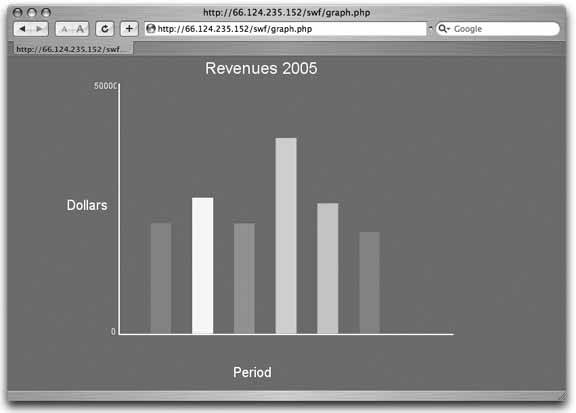
A good additional hack would be to integrate gradient fills into the rendering of the background or the bars. After that, you could do some simple things to give the application a more three-dimensional look. You could add more traditional graph features like grid lines or tick marks, or even add a legend. Flash has tremendous support for other media, such as video and audio formats. You could integrate those as well. Another hack would be to animate every aspect of the graph when it is first displayed. If you really want to hack, you could add support for Flash Version 8 and add some more great things, such as real-time filter effects (blurring, for example). The visual capabilities of Flash are tremendous, and there are many examples of this on the Internet to inspire you. We're not done yet, though; this covers only the visual side of the hack. I was just displaying random data. With PHP, it should be easy to render the XML file with some real data from a database. Another simple thing to do would be to add a timer to have the graph rerender periodically. You could also pass parameters to the PHP script that generates the graph. If you take that route, you could avoid the XML file altogether and just query for the data to display at render time. If you add UI event handling (buttons, mouse, keyboard), you could even pass different parameters to the XML URL and display data dynamically to the user. There are many, many possibilities. Dru Nelson |


